Updates
How updates work
This page is for the administrator who wants to know what happens on a workstation when the host updates, and when. The settings that change the window are on Settings.
How an update works
Section titled “How an update works”Timing
Section titled “Timing”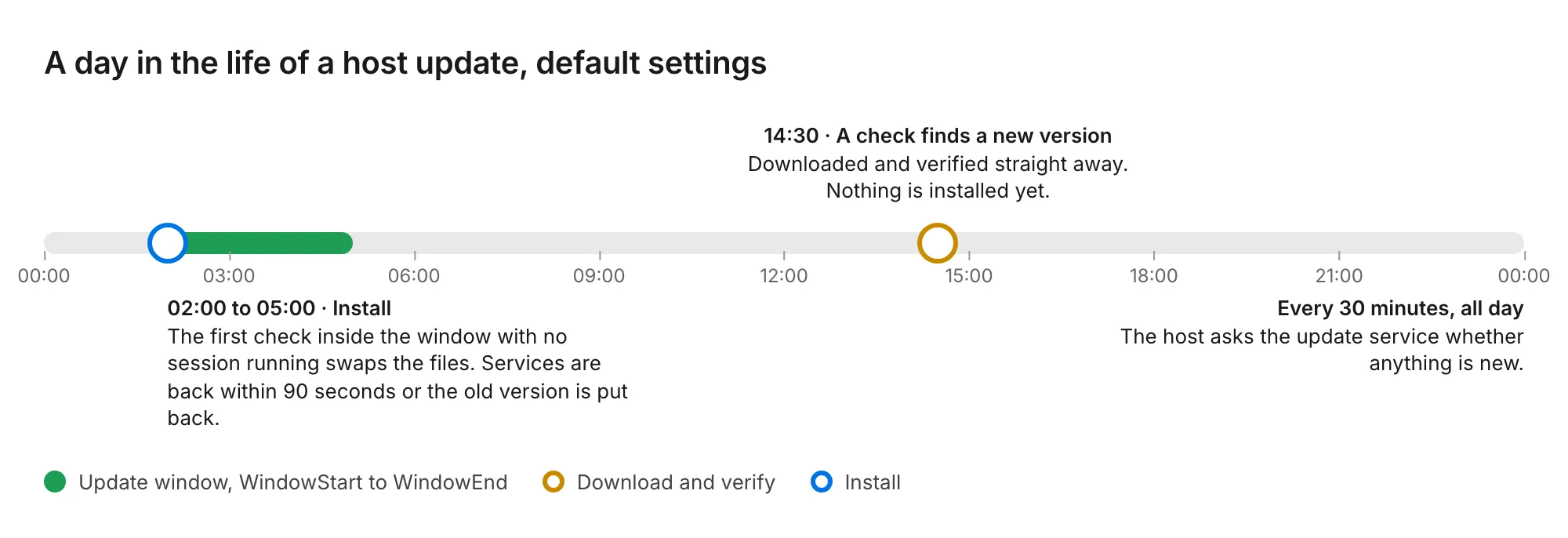
| Step | When |
|---|---|
| Check | Every 30 minutes, plus up to 5 minutes of random delay so a fleet does not check at once. Set by PollMinutes. |
| Download and verify | As soon as a check finds a new version, at any hour. A workstation arrives at its window with the update already on disk and checked. |
| Install | Inside the window, 02:00 to 05:00 local time by default, and only when no session is running. A session in progress holds the install until the session ends, whatever the window says. |
| Health check | Up to 90 seconds after the services start. |
The window gates the install, never the download.
What the host checks before it installs anything
Section titled “What the host checks before it installs anything”Every update must pass all of these. A failure at any step leaves the installed version untouched and is reported to the update service.
| Check | What it proves |
|---|---|
| Three witnesses agree | Computle publishes a digest of each release to three independent cloud storage providers. The host fetches all three. All three must answer and all three must match the manifest. If one is unreachable or disagrees, nothing is installed. |
| Release signature | The manifest is signed with a release key whose public half is built into the updater. A manifest signed by anything else is refused. |
| SHA-256 of every file | Each downloaded file must match the checksum in the manifest, checked again after it is copied into place. |
| Code signature | Every program and DLL must carry a valid Authenticode signature, with revocation checked online. |
| Signer | The signature must be Computle Limited’s. A file signed by any other publisher Windows trusts is refused. |
| Driver set | An update that changes the drivers is refused by the updater. Drivers change only through the installer. |
| Check | What it proves |
|---|---|
| Three witnesses agree | As on Windows. All three must answer and match the manifest. |
| Release signature | The manifest is signed with a release key whose public half is built into the updater. |
| SHA-256 of the package | The downloaded package must match the checksum in the manifest. The package file itself is not signed; the manifest signature and the witnesses stand in for a package signature. |
The package is then installed with apt, dnf or zypper, so a library it needs is pulled in or nothing changes.
See Security for how this fits the rest of the security model.
What counts as healthy
Section titled “What counts as healthy”After the swap the updater waits for:
- The four required services (Remotle service, Broker, Session server, Capture worker) to reach Running.
- The installed version file to name the new version.
- The host to register with the connection service, reported since the swap.
- The licence check to not report invalid.
If any of these fails within 90 seconds, the previous files are moved back and the services started again. The updater then checks that the previous version is healthy too, and reports the result to the update service. A host is never left on a version that does not register.
On Linux the same judgement is made from computle-hostd staying active for 20 seconds, /var/lib/computle/broker.status fresh and registered, and /var/lib/computle/license.status not invalid. Otherwise the previous package is reinstalled.
Updating the updater
Section titled “Updating the updater”The updater updates itself in two stages, because a program cannot replace its own file while it runs: a copy of the new updater performs the swap and starts the new service. If the new updater does not start, the previous one is restored.
Related
Section titled “Related”Questions
Section titled “Questions”What happens on the workstation during an update?
Section titled “What happens on the workstation during an update?”The host services stop, the files are swapped, and the services start again. The workstation itself is not restarted, nobody is signed out, and open programs are untouched. No session is running at that moment, because an update waits for the session to end.
How long is the workstation unavailable to connect?
Section titled “How long is the workstation unavailable to connect?”From the moment the services stop to the moment the host registers again. The health check allows up to 90 seconds for that.
Does an update ever need a restart?
Section titled “Does an update ever need a restart?”The updater never restarts the workstation. Updates that change the drivers are delivered through the installer, which can ask for a restart.
Where do updates download from?
Section titled “Where do updates download from?”The update service at updates.computle.com returns a manifest whose file links point at Computle’s download storage, and the three witnesses are at the domains listed under Workstations on Network Requirements.